
Free Chrome extension
Refresh Page Automatically
After Specified Seconds
Set the seconds, press Start, and your page reloads on its own. Free, no sign-up.
100,000+ users · 4.8★ from 1.7K ratings · Free
 Auto Refresh Plus
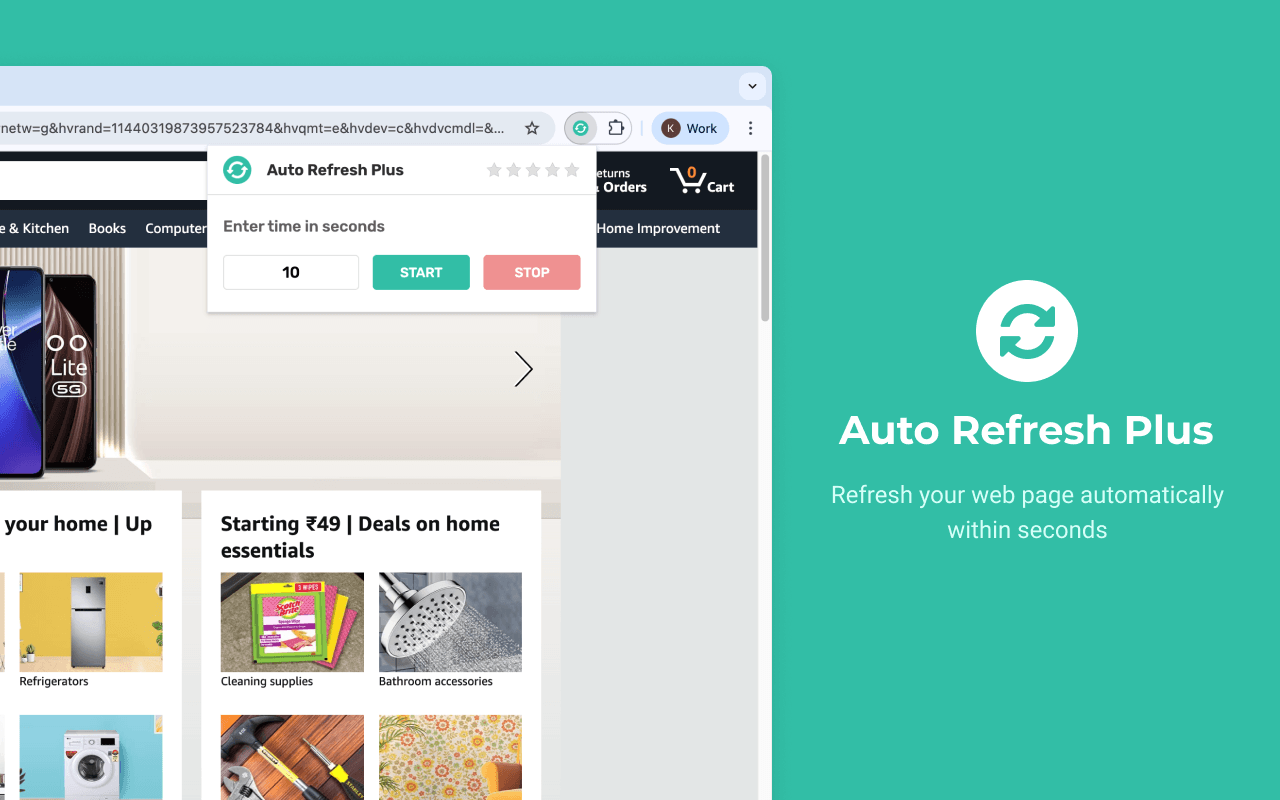
Press START to begin auto refresh.
Try it: this is a live demo of the extension popup.
What is Auto Refresh Plus?
Auto Refresh Chrome Extension: This browser extension allows users to refresh a webpage automatically at specified intervals. It helps to save time and stay updated with dynamic content without manual intervention.
You type a number of seconds into the popup and press START. From then on the tab reloads itself on that timer, whether you are looking at it or working somewhere else. Each tab keeps its own timer, so a price page can reload every 10 seconds while a dashboard in another tab reloads every 5 minutes.
It works on any website you can open in Chrome: shops, booking sites, job boards, admin panels and live reports. There is nothing to configure beyond the interval, no account to create, and nothing to pay. Press STOP, or close the tab, and the refreshing ends.
That simplicity is the point. 100,000+ people use Auto Refresh Plus because it does one job and does it reliably: it keeps the page in front of you up to date, so you don't have to keep pressing F5.
How it works
Three steps, about five seconds. No settings page to learn.
- 1
Set Interval
Open the popup and enter the time interval at which the page has to refresh.
- 2
Start Refresh
Click START. The countdown begins right away, and you can keep working in other tabs.
- 3
Auto Refreshing
Now the page refreshes at the entered time interval, until you stop or close the page.
Everything you need, nothing you don't
Auto Refresh Plus does one thing: reload the page on a timer you choose.
Refresh interval in seconds
Type the exact number of seconds you want, from 1 second up to as long as you like. The page reloads on that timer until you stop it.
Works per tab
Every tab has its own timer. Refresh one page every 5 seconds and another every 2 minutes at the same time.
One-click start and stop
START begins refreshing straight away. STOP ends it. Closing the tab ends it too.
Free, no account
No sign-up, no trial and nothing to unlock. Install it and it works.
Lightweight
A small popup and a timer. No settings pages to learn and nothing to slow Chrome down.
What people use Auto Refresh Plus for
Any page that changes while you wait is a page worth putting on a timer.
- Finance & StocksMonitor stock prices and financial news in real-time.
- Flash SalesCatch limited-time offers and product restocks instantly.
- Travel DealsTrack flight prices and last-minute hotel availability.
- Ticket BookingSecure tickets for concerts and events as soon as they drop.
- FreelancingBe the first to apply for new job postings on platforms.
- ResearchKeep track of changing data and updates on any webpage.
What users say on the Chrome Web Store
Rated 4.8 out of 5 from 1.7K ratings. These are real reviews, quoted as written.
“Does exactly what I need it to! Working in IT and using Microsoft Forms, it is always handy to have it full screen and refresh to see any new changes, with this extension that is now possible.”
Joey Poole ·
“Best to use per tab, user can set required refresh time lapse on each tab. Fabolous”
Abdullah Muhammad ·
“Well it works per tab. And each tab can have its own timing set. Overall, I like it. … I open messages/google.com in a tab to monitor incoming texts. Using this I can force the tab to constantly refresh even if the tab is in the background.”
David Chan ·
“Does exactly as it says on the tin.!! Perfect tool 😅👌”
Peter Edis ·
“Great extension! Works perfectly and saves me a lot of time.”
samuel habbasan ·
“Makes work so much easier! Love it”
Breman Nope ·
Looking for a different “Auto Refresh Plus”?
Several extensions use similar names. This site is for Auto Refresh Plus, the simple interval-refresh extension used by 100,000+ people and built by the Auto Refresh Plus team. It is not “Auto Refresh Plus | Page Monitor” from autorefresh.io, and we are not affiliated with it.
If you want a timer that reloads the page and nothing else, you are in the right place. More about us.
Guides
Step-by-step help for reloading pages on a timer, in Chrome and other browsers.
- How to Auto Refresh a Page in ChromeChrome has no built-in auto refresh. Here are three ways to reload a page automatically: with an extension, from the console, or with a bookmarklet.Read guide
- How to Auto Refresh a Page in Edge, Brave and OperaStep-by-step ways to auto refresh a web page in Microsoft Edge, Brave and Opera, including how Chrome Web Store extensions work in each browser.Read guide
- How Often Should a Page Auto Refresh? (5, 10, 30 Seconds and More)Pick the right auto refresh interval for prices, tickets, dashboards and job boards, and learn when refreshing every few seconds is too often.Read guide
- How to Refresh a Page Automatically Without an ExtensionReload a page on a timer with no extension: a console snippet, a meta refresh tag or a bookmarklet. Includes the limits of each method.Read guide
- How to Keep a Website Session Alive with Auto RefreshWhy websites log you out after inactivity, how a timed page refresh keeps your session active, and which interval to use without overdoing it.Read guide
Frequently asked questions
Is Auto Refresh Plus free to use?
Yes. Auto Refresh Plus is 100% free. There is no premium version and no account.
Is it safe to use on any website?
Auto refreshing runs locally in your browser and only reloads the tab you choose. New installs show a consent prompt first: anonymous usage data is collected only if you choose “Accept,” and the extension works exactly the same if you decline. Users who installed before the prompt was introduced are treated as having accepted and can opt out by uninstalling. Details are in our privacy policy.
How do I set the refresh interval?
Open the tab you want to reload, click the Auto Refresh Plus icon in the Chrome toolbar, type the number of seconds under “Enter time in seconds” and press START. For example, type 60 to reload once a minute or 300 for every five minutes. Not sure what to pick? See how to choose an interval.
Does it keep refreshing in background tabs?
Yes, the timer keeps running when you switch to another tab. If Chrome's Memory Saver puts an inactive tab to sleep, that tab can stop reloading. You can exclude a site from Memory Saver in Chrome's Performance settings. More tips are on the help page.
Does refreshing stop when I close the tab?
Yes. The page refreshes at the interval you entered until you press STOP or close the page. Timers are not restored after you restart Chrome, so start them again when you reopen the page.
Which browsers does it work in?
Auto Refresh Plus is built for Google Chrome and installs from the Chrome Web Store. For other options, read how to auto refresh in Edge, Brave and Opera.
How do I stop auto refresh?
Click the extension icon on that tab and press STOP. Closing the tab also stops it.
Can I set random refresh intervals?
No. Auto Refresh Plus keeps things simple: one fixed interval in seconds.
Is this the same as Auto Refresh Plus | Page Monitor?
No. “Auto Refresh Plus | Page Monitor” is a different extension from a different developer (autorefresh.io). This site is for the simple interval-refresh extension. Read more on our about page.
Stop pressing F5.
Join 100,000+ people who let Auto Refresh Plus keep their pages up to date.